Installation
This page describes how to install the miro EdgeCard mioty into a host system. For general information on the installation of miro EdgeCards, refer to the EdgeCard Installation Guide.
Warning
Disconnect the host system from power before you install or remove the card.
Insert the Card
The miro EdgeCard mioty is a full-size Mini PCIe card. Install it into an mPCIe slot of the host system:
- Insert the card at an angle into the mPCIe slot. Make sure that the card contacts fully engage with the slot connector.
- Push the card down until it is parallel to the host board.
- Attach the card with the two mounting screws.
The card is powered from the mPCIe slot (3.3 V). No external power supply is necessary. The host system must provide a stable 3.3 V supply within the mPCIe specification.
The host system enclosure shall prevent unauthorised physical access to the installed card.
Connect the Antenna
Connect the antenna to the middle U.FL connector, as shown below.
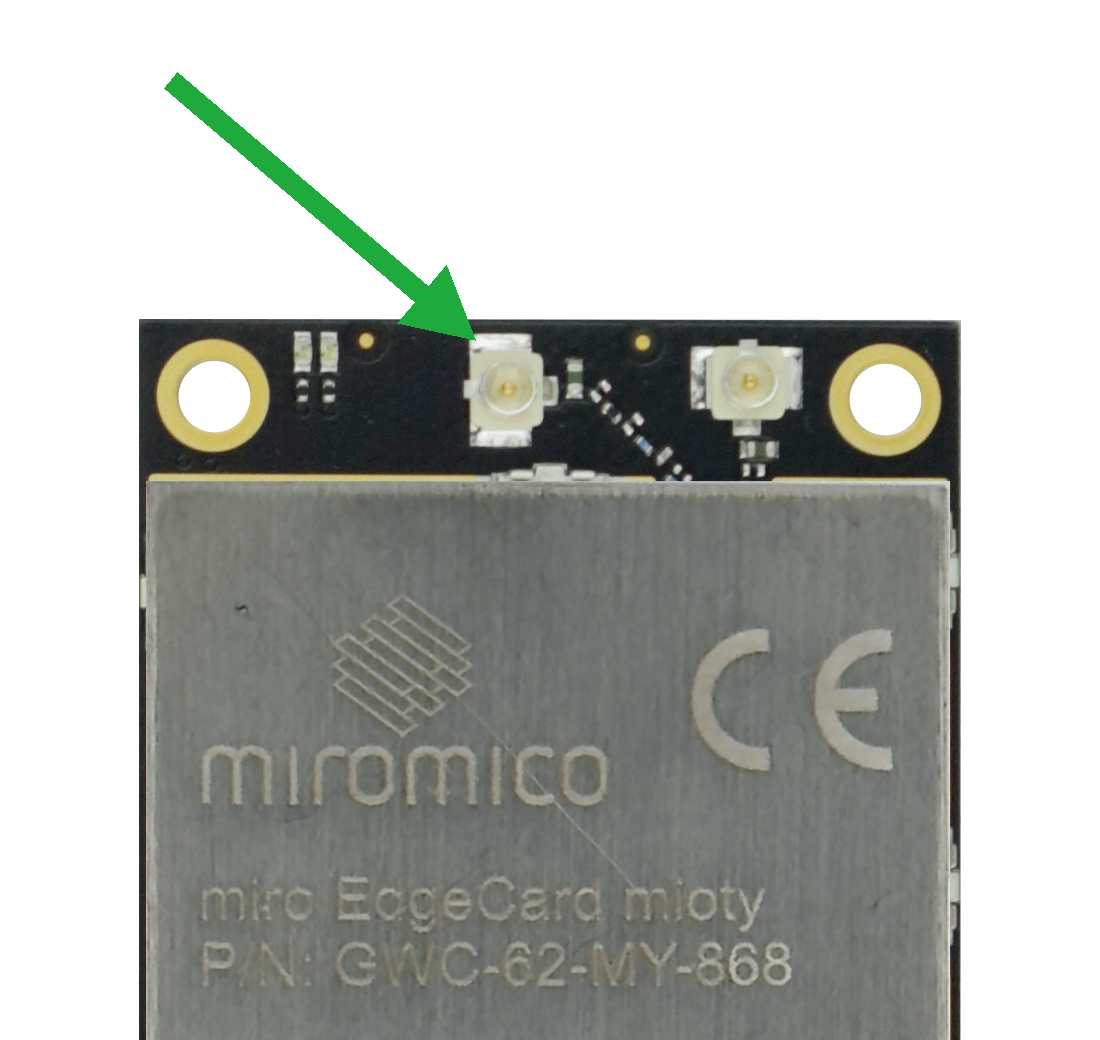
Use a U.FL to SMA adapter cable to connect an external antenna. For the certified antenna, see Antenna Recommendation.
Second antenna port
The second U.FL connector is for antenna diversity. This function is not fully supported yet and is not part of the certification.
Antenna routing, placement, and compliance with applicable RF exposure limits are the responsibility of the system integrator.
Next Steps
After installation, configure the host networking and the card as described in the Integration Guide.