Settings
Scenes
A total of 22 scenes are available. Scene number 0 can't be changed, because it is reserved for OFF. 21 scenes can be configured.
A single scene consists of the following:
| Property | Description |
|---|---|
| Color | RGB hex value for the LED color |
| Timeout | How long a scene will stay on in minutes. A value of 0 means the scene will stay active, until another downlink changes it. |
| Melody | What melody the buzzer should play |
| Repeat | If the melody should be repeated until the timeout or only be played once |
| Type | If the melody should be repeated until the timeout or only be played once |
| Speed | If the melody should be repeated until the timeout or only be played once |
Type
| Value | Melody |
|---|---|
| 0 | Static |
| 1 | Blinking |
| 2 | Breathing |
Melodies
Currently, there are only a set of predefined buzzer melodies available:
| Value | Melody |
|---|---|
| 0 | None |
| 1 | Fast |
| 2 | Medium |
| 3 | Slow |
| 4 | Ascending |
| 5 | DoubleUp |
| 6 | Double |
| 7 | Triple |
Defaults
Scene 0 can't be changed. It corresponds to all LEDs and buzzer off.
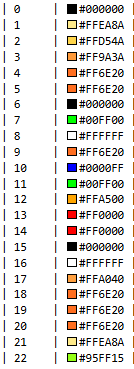
| scene | color | melody | repeat | delay | type | speed |
|---|---|---|---|---|---|---|
| 0 | #000000 | 0 | 0 | 0 | 0 | 0 |
| 1 | #FFEA8A | 0 | 0 | 0 | 0 | 1000 |
| 2 | #FFD54A | 0 | 0 | 0 | 0 | 1000 |
| 3 | #FF9A3A | 0 | 0 | 0 | 0 | 1000 |
| 4 | #FF6E20 | 0 | 0 | 0 | 0 | 1000 |
| 5 | #FF6E20 | 0 | 0 | 0 | 2 | 3000 |
| 6 | #000000 | 0 | 0 | 0 | 0 | 1000 |
| 7 | #00FF00 | 1 | 0 | 0 | 0 | 1000 |
| 8 | #FFFFFF | 2 | 0 | 0 | 0 | 1000 |
| 9 | #FF6E20 | 3 | 0 | 0 | 0 | 1000 |
| 10 | #0000FF | 4 | 0 | 0 | 2 | 3000 |
| 11 | #00FF00 | 5 | 0 | 0 | 0 | 1000 |
| 12 | #FFA500 | 6 | 0 | 0 | 0 | 1000 |
| 13 | #FF0000 | 7 | 0 | 0 | 0 | 1000 |
| 14 | #FF0000 | 8 | 0 | 0 | 2 | 1000 |
| 15 | #000000 | 9 | 0 | 0 | 0 | 3000 |
| 16 | #FFFFFF | 10 | 0 | 0 | 2 | 3000 |
| 17 | #FFA040 | 10 | 1 | 0 | 0 | 1000 |
| 18 | #FF6E20 | 0 | 0 | 0 | 0 | 1000 |
| 19 | #FF6E20 | 0 | 0 | 0 | 0 | 1000 |
| 20 | #FF6E20 | 0 | 0 | 0 | 2 | 3000 |
| 21 | #FFEA8A | 0 | 0 | 0 | 2 | 3000 |
| 22 | #95FF15 | 0 | 0 | 0 | 0 | 1000 |
Color Table
Flags
A set of flags are used to toggle certain functionality:
| Flag | Description | Default |
|---|---|---|
| Confirmed uplinks | Confirmed uplinks are used to make sure, that the regular status interval is received by the network | Off |
| Duty Cycle | Comply with the ETSI/FCC duty cycle limitations. This may be useful to disable, if Class C is disabled and a fast status interval is used. | On |
| Class C | If desired, this can be disabled to change the device to LoRaWAN class A. It is recommended to use a low status interval if disabled, otherwise downlinks may be severely delayed | On |
| Buzzer | If disabled, the buzzer will never be used | On |
Note: The AS923 variant has the duty cylce turned off by default
Configuration
These miscellaneous configuration options are used to fine-tune the device functionality:
| Setting | Description | Default |
|---|---|---|
| Status interval | Time of the periodic keep alive message in minutes. [0 - 65536] | 720 |
| Volume | The buzzer volume. [0=off,1=low,2=medium,3=high] | 3 |
| Brightness | The LED brightness. This value is used to scale the scene color. Low values may result in color shift. [0-255] | 255 |
| Reset time | Period of automatic resets resulting in a rejoin in hours. A value of 0 means the device will never automatically reset. [0-255] | 0 |
| Number of LEDs | The number of LEDs used. This may be highter than what is actually available. [0-255] | 24 |