WiFi Client
The WiFi Client page connects the gateway to an existing WiFi network and uses it as a backhaul for internet connectivity.

Connection Status
The current connection status is shown at the top of the page, including the connected SSID and signal strength.

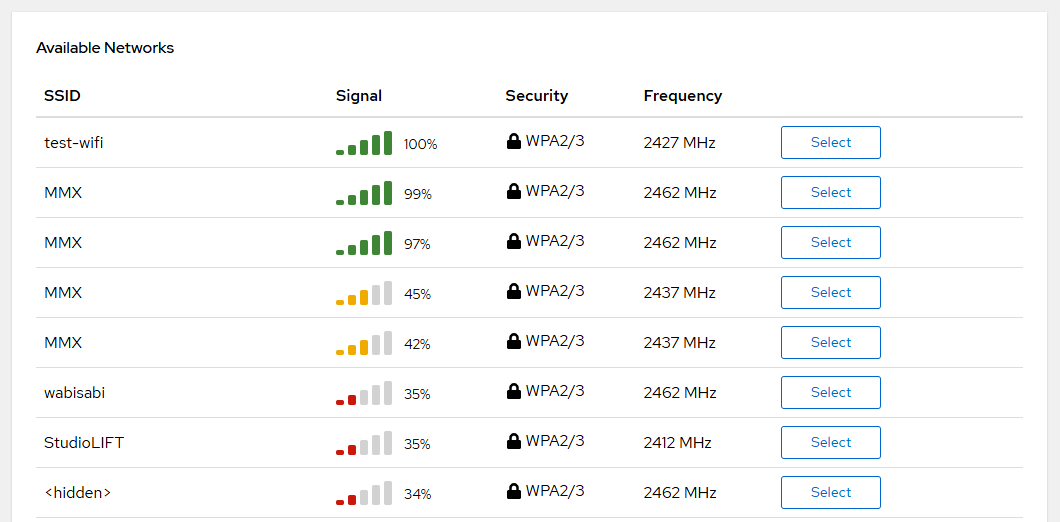
Available Networks
Scan for nearby WiFi networks. The scan result shows:
| Column | Description |
|---|---|
| SSID | Network name |
| Signal | Signal strength (0–100%) |
| BSSID | Access point MAC address |
| Frequency | Channel frequency in MHz |
| Security | Open, WEP, WPA, WPA2, or WPA3 |
Click Scan to refresh the list. Select a network and click Connect to join it.
Connect to a Network
| Parameter | Description |
|---|---|
| SSID | Network name (required) |
| Password | Network password (optional for open networks) |
Saved Networks
Previously connected networks are saved and listed. Available actions:
| Action | Description |
|---|---|
| Connect | Connect to this saved network |
| Reconnect | Force reconnection to the network |
| Forget | Remove the saved network |