Edge Slots
The Edge Slots page controls the power state of the Mini PCIe extension slots. It allows you to power individual slots on or off and reset them. The installed card is auto-detected after a slot is powered.

Slots
The gateway provides the following extension slots:
| Slot | Description | Available on |
|---|---|---|
| s1 | Mini PCIe slot 1 | Core, Performance |
| s2 | Mini PCIe slot 2 | Core, Performance |
| s3 | Mini PCIe slot 3 | Performance |
| lte | Dedicated LTE modem slot | Core |
Slot Controls
Each slot has individual controls:
| Control | Description |
|---|---|
| Power On | Power up the slot and start card enumeration |
| Power Off | Cut power to the slot |
| Reset | Power cycle the slot and re-enumerate the card |
After powering on, the gateway detects the installed card automatically. Detection may take up to 20 seconds.
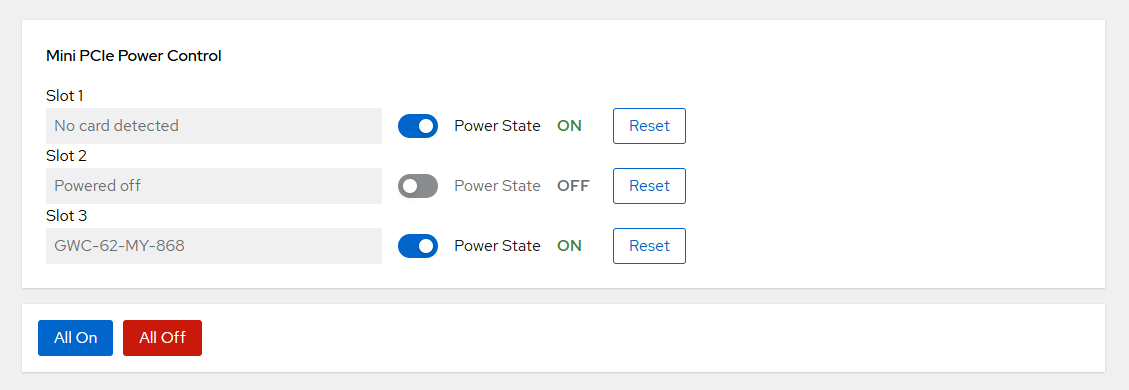
Slot States
| State | Description |
|---|---|
| Powered off | The slot has no power |
| Waiting for enumeration | Slot powered, card detection in progress |
| No card detected | Slot powered, no card found |
| Card name (e.g. EDGE-GWC-02-LW-868) | Card successfully detected |
Bulk Operations
Use the All On and All Off buttons to power all slots simultaneously.
Note
Powering off a slot that hosts an active LPWAN card (LoRaWAN, mioty) will stop packet forwarding for that card.